> ## Documentation Index
> Fetch the complete documentation index at: https://docs.gdhub.io/llms.txt
> Use this file to discover all available pages before exploring further.
# How to find a talent for your team
> Making games is challenging and almost always a team effort. To find a team of like-minded people, we suggest the following approach:
1. **Project Information**. In your project settings, fill in all the fields and add a cover image, description and video pitch where potential team members can learn about your project and about you as a person they would enjoy working with. This information will be displayed on every vacancy you post and on the public project page.
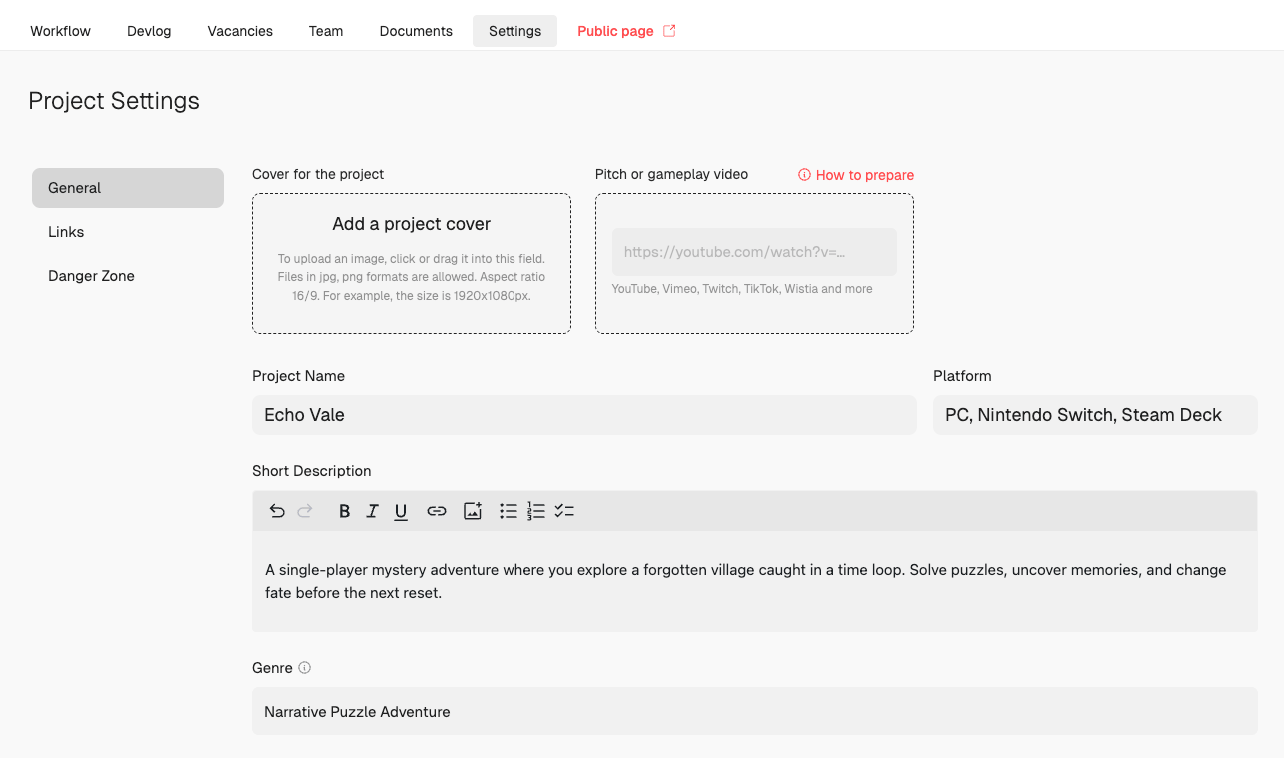 It's a big plus to attach a **video pitch** of your project — or at least a short **gameplay or prototype video** showing what you already have. Specialists are far more likely to respond when they can actually see the project, get a feel for its direction, and sense the momentum behind it.
This guide is for project authors getting ready to launch their projects and build a team.
2. **Create** the necessary **vacancies** on the Vacancies page. We will publish them not only on the platform but also on our social media channels to attract the most relevant specialists to you.
3. As responses to vacancies come in, review the candidates’ information on the same Vacancies page, contact them using the provided details, interview, and either accept them into your team or decline if they don’t fit.
Vacancies marked as Draft are visible only to you. To make them visible to others, click Publish.
If a vacancy is no longer relevant, you can switch it back to Draft or archive it (using the lock icon to the right of the vacancy). You can restore archived vacancies if needed.
Good luck building your team!
It's a big plus to attach a **video pitch** of your project — or at least a short **gameplay or prototype video** showing what you already have. Specialists are far more likely to respond when they can actually see the project, get a feel for its direction, and sense the momentum behind it.
This guide is for project authors getting ready to launch their projects and build a team.
2. **Create** the necessary **vacancies** on the Vacancies page. We will publish them not only on the platform but also on our social media channels to attract the most relevant specialists to you.
3. As responses to vacancies come in, review the candidates’ information on the same Vacancies page, contact them using the provided details, interview, and either accept them into your team or decline if they don’t fit.
Vacancies marked as Draft are visible only to you. To make them visible to others, click Publish.
If a vacancy is no longer relevant, you can switch it back to Draft or archive it (using the lock icon to the right of the vacancy). You can restore archived vacancies if needed.
Good luck building your team!